New Long jobs keep their session Working

Which agent touched this project last?

Agent Trail is a native macOS menu-bar app that puts your coding projects and live Claude, Codex, and Grok sessions in one panel. See recorded edits and trends, who is working or waiting, and jump back to the session.

  • Public alpha
  • macOS 14+
  • Free · MIT
  • No account, no telemetry
Agent Trail Projects panel with synthetic projects: a Pulse strip with live sessions, 7-day edits, active projects and day streak; project cards with 30-day sparklines, profile mix bars, live needs-input, working and idle counts, and a Jump button.
Sample data. Every project, path, and count in these screenshots is synthetic.

New in 0.1.0-alpha.9 · For training runs and other long jobs

The turn ended. The training run didn’t.

Start a training run, a long build, or a loop that waits on a job, and let Claude’s turn end. Agent Trail keeps that session Working and labels it Working in background until the command exits, instead of calling it Idle.

Claude turn
Turn
Bash command it startedits own process group
training run, build, wait loop
Before alpha.9
Working Idle
Agent Trail now
Working Working in background Idle
Timeline: a Claude turn starts a Bash command and then ends while the command keeps running. Before alpha.9 the session showed Idle as soon as the turn ended. Now it shows Working in background until the command exits, and then Idle.

What you see

Menus, Jump entries, and the card tooltip say Working in background. The tooltip names when the command started:

Claude · Main finished its turn, but a command it started at 2:14 PM is still running in the background.

The menu-bar dot keeps moving while the job runs. When the command exits the session goes Idle, and if nothing else is working or waiting, the icon shows a checkmark for a few seconds.

How it knows

Claude runs each Bash command in its own process group, while MCP servers stay in Claude’s. Agent Trail lists the session process’s children and counts only those that lead their own group and started before the turn ended.

  • Claude session process
  • MCP serverstays in Claude’s groupignored
  • Bash commandown group, started during the turncounts
  • Hookstarted after the turn endedignored

What it reads, and the limits

Only each child’s parent, process group, and start time, through libproc. No arguments, no environment, and no extra processes started.

  • A command that never exits keeps its session Working until it ends or the session closes.
  • A job that fully detaches, with no command still waiting on it, cannot be tied to a session. Keep a command waiting on it, such as a loop that polls for the job to finish.
  • Claude sessions only. Codex and Grok status is unchanged.
  • AgentTrailInspect --live reports backgroundSince.

What’s in the panel

Every project once. Every agent on it.

Two assistants, the same repository, different worktrees and conversations. Agent Trail brings recorded history and reported live status together on one card per project, so getting back to work starts with the right window.

One card per project, live status on each

A project is the Git checkout where an assistant’s confirmed edits actually landed. Claude, Codex, and Grok working in the same repository share one card, even when they were started in different folders, and the card shows what each of them is doing now.

  • A 30-day sparkline, recorded edits with the change from the previous 30 days, and a profile mix bar.
  • The Pulse strip: live sessions, edits in the last 7 days, active projects, and your day streak.
  • Search, Needs input and Working filters, Shared projects, and sorting by edits, trend, or name.
  • Move a repository and its history follows. Earlier locations are remembered.
Needs inputClaude asked, or Grok has a permission request
WorkingAn active turn, or a command it started still running
IdleThe turn ended. It doesn’t mean you need to reply
UnknownNo verified status. Never guessed from edits

Each card counts its sessions in every state, in total and by profile. Projects needing input sort first, then working ones.

Jump back to the session

Each card’s main button opens the session that most needs you, with its profile, title, and time in that state. The ⌄ menu lists every live session and opens the worktree in your editor, terminal, or Finder.

  • Claude Code sessions open through Claude’s session link, and with several Claude instances the session’s own instance comes forward first.
  • Codex threads open through codex://threads when the Codex app owns them.
  • Grok brings forward the terminal it runs in.

Agent Trail acts only when you click, and only on apps already running. It never launches, quits, or restarts an assistant, and needs no Automation or Accessibility permission.

Answer·Run the sync migration4m ↗
Open·Refactor parser tests12m ↗
Resume·Design token cleanup2h ↗

Needs input first, then working, then idle.

A menu-bar icon that tells you

See the state without opening anything. Right-click the icon for live sessions grouped by state, and pick one to jump to it.

Animation runs in Core Animation and stops for Reduce Motion, Low Power Mode, and sleeping displays.

  • Plain trailNothing is working or waiting.
  • A dot travels the trailAt least one session is working.
  • Amber, with a countA session needs input.
  • CheckmarkWork just finished and nothing else runs.

Growth statistics

Recorded edits per day with a 7-day average and peak, a 26-week Trail calendar, when your edits land by hour and weekday, each profile’s share with delegated edits, and where edits landed.

  • Local activity days start at 05:00, so late-night work counts toward the evening it began.
  • Changes are shown only when saved history covers the previous period.
  • Counts are confirmed tool edits, not lines of code, quality, or productivity.
Agent Trail Growth tab with synthetic data: KPI tiles for recorded edits, active days, saved sessions and busiest day; a stacked recorded-edits chart by profile with a 7-day average; and the Trail calendar.

An activity portrait to share

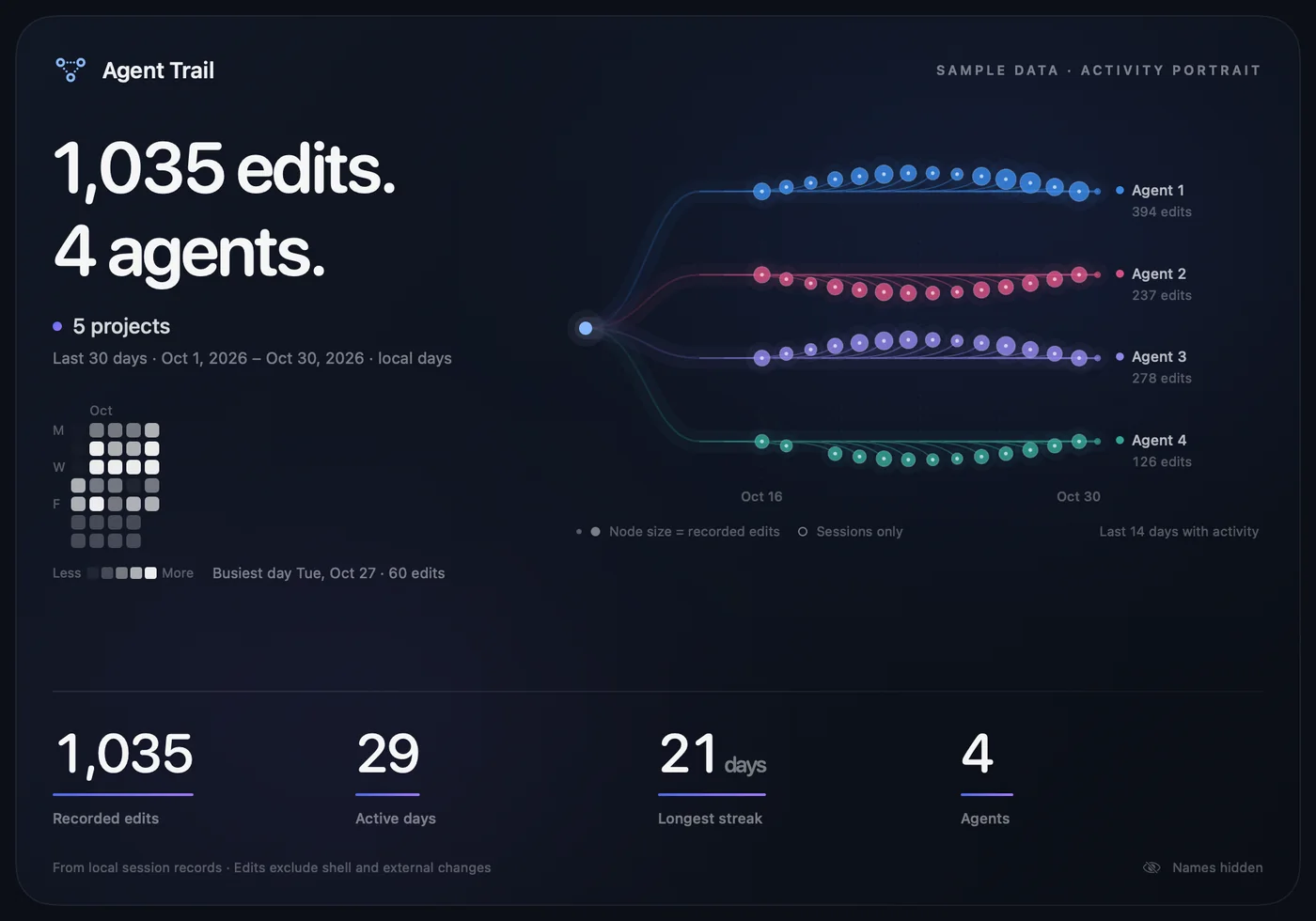
Preview a card for any project and period, then export a PNG to your Mac. Project and profile names are hidden by default. Folder paths and your hour-of-day rhythm are never included, and nothing is posted or uploaded.

Sample exported activity portrait: 1,035 edits by 4 agents across 5 projects in 30 days, a mini calendar, a branching activity tree per anonymized agent, and totals for recorded edits, active days, longest streak, and agents.

Supported assistants

Claude Desktop

Edits
A successful Edit or Write
Live
Needs input, Working (including background commands), Idle
Jump
Opens the Code session

Codex

Edits
A completed FileChange
Live
Working and Idle on loaded threads; input requests are not yet distinguished
Jump
Opens the thread in the Codex app

Grok

Edits
A completed write or search_replace
Live
Needs input for permission requests, Working, Idle
Jump
Brings its terminal forward

Gemini CLI, OpenCode, and Cursor are not supported yet. Shell commands and external editors are not attributed: this is a record of supported agent activity, not a complete audit of file changes.

Privacy

Everything stays on your Mac.

No account, no telemetry, no cloud, and no automatic update checks. Agent Trail indexes locally and sends your records nowhere.

Read-only

It reads the assistants’ private on-disk formats and never writes them. No hooks, no injected code, and no edits to assistant data. Codex turn metadata is opened read-only.

Titles in memory only

Session titles and Claude’s “needs you to…” sentence are read live and kept in memory. They are never cached, exported, or included in renders.

Caches without content

Incremental caches keep file positions, tool IDs, dates, and paths. Never prompts, commands, patches, diffs, or conversation text. Paths can still be sensitive, so keep them private.

Exports you control

Portraits are saved where you choose, with names hidden by default and folder paths never included. Dates, totals, and patterns stay visible, so review a card before sharing it.

Install

Build it yourself, or grab the alpha.

Agent Trail needs macOS 14 or later. It has no third-party dependencies and no developer account is required to build it.

Build from source

Recommended

The supported starting point for this alpha. Needs Swift 6 or later, from Xcode or the Command Line Tools.

git clone https://github.com/NotYaz/agent-trail.git
cd agent-trail
swift test
./scripts/build-app.sh
open "dist/Agent Trail.app"

The panel opens right away and a trail icon stays in the menu bar, with no Dock icon. To install, copy dist/Agent Trail.app to Applications.

Just looking?

Demo mode shows synthetic projects and live states. It reads none of your assistant history or settings.

swift run AgentTrail --demo

Read the README for profiles, live-status details, and what every number means.

Support

Free and open source. Support is optional.

Every feature stays available without payment. If Agent Trail saves you time, you can help keep it going.

Crypto addresses Bitcoin · ETH, USDC, USDT on Ethereum, Base, or Arbitrum One · USDT on TRON

Send only the assets listed here, and only on the networks shown. Coins sent on any other network are usually lost. The canonical list is docs/SUPPORT.md in the NotYaz/agent-trail repository; copies of this page can show different addresses. Compare the whole address your wallet shows with that page, not only its first and last characters.

QR code for the Bitcoin address

BTC on Bitcoin

bc1qq3jl4wnymxq85xne0sgvx3ykkhp80qzq43hxt0
QR code for the ETH, USDC, and USDT address

ETH, USDC, USDT on Ethereum, Base, or Arbitrum One

0xffEbCb8D2c5e294436C69d004449654fc5eC84d5
QR code for the TRON address

USDT on TRON (TRC-20)

TUiJVSBHLgRMuZptXBNwYtEXagACujifDj

Each QR code holds only the address. Agent Trail does not process payments or need access to a wallet.